MCP Server
The Model Context Protocol (MCP) is an open standard that allows AI coding assistants—such as Cursor, VS Code (Copilot/Cline), Claude Code, Claude Desktop, OpenAI Codex, and Antigravity—to communicate directly with external tools and services.
With the Lineicons MCP Server, your AI assistant can discover, inspect, and automatically import and insert icons into your code in any supported framework (React, Vue, Svelte, Angular, React Native, HTML / SVG, or Web Font).
Authentication & Endpoint
The Lineicons MCP server is hosted as a remote streamable HTTP service.
- MCP Endpoint:
https://api.lineicons.com/mcp - Authentication: Sent via the
AuthorizationHTTP header with a Bearer token:Authorization: Bearer <YOUR_API_TOKEN>
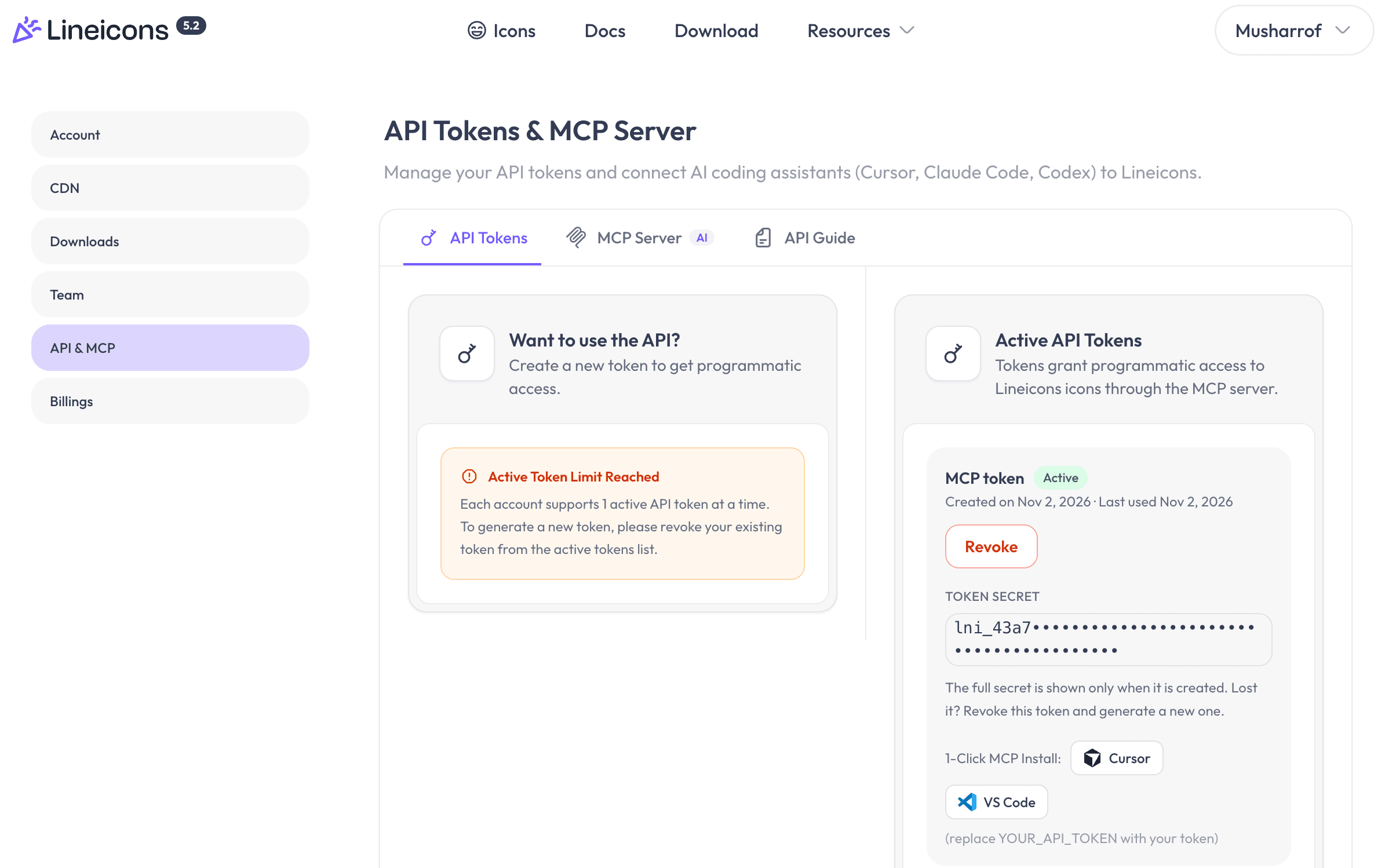
Generate your API token in the Lineicons dashboard under API Tokens & MCP Server . Lineicons allows one active token per account. If you regenerate or revoke your token, the previous token is immediately invalidated.
Always send your API token through the Authorization header. Never append tokens directly as URL query parameters.
Editor Configuration
Select your AI editor or client below to configure the Lineicons MCP server.
Cursor
Cursor
Add Lineicons to Cursor either in project-level .cursor/mcp.json or globally under Cursor Settings → Features → MCP → Add New MCP Server.
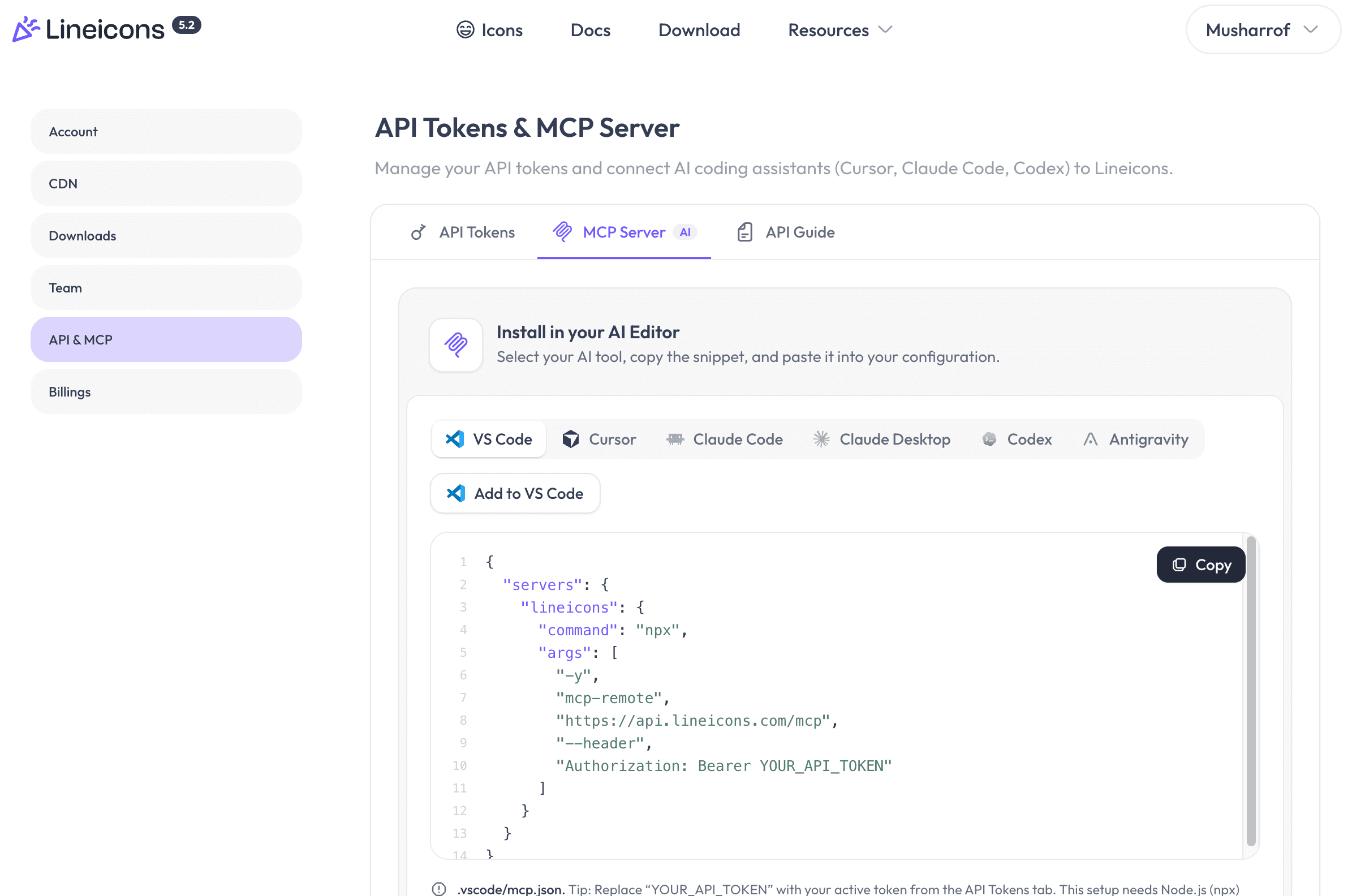
{
  "mcpServers": {
    "lineicons": {
      "url": "https://api.lineicons.com/mcp",
      "headers": {
        "Authorization": "Bearer YOUR_API_TOKEN"
      }
    }
  }
}
If you are logged into your Lineicons account on the web, you can also use the one-click Add to Cursor button on the API Tokens & MCP Server page.
Available MCP Tools
The Lineicons MCP server provides 6 tools that allow your AI assistant to explore the entire Lineicons catalog and write ready-to-run component code:
| Tool | Description |
|---|---|
search_icons | Search icons by keyword, style, or category. Returns slugs, styles, and whether the icon is Pro (locked: true on Free plan). |
get_icon | Retrieve an icon’s metadata, raw SVG markup, and usage snippet. |
get_icon_component | Generate framework-specific, copy-pasteable component code (React, Vue, Svelte, Angular, React Native, HTML/SVG, Font Class). |
list_categories | List all icon categories with category slugs and icon counts. |
list_styles | List available icon styles (stroke, outlined, solid, duotone, bulk) and their icon counts. |
get_account_status | Return current plan status (free or pro), token validity, and upgrade links. |
Tool Schemas & Parameters
1. search_icons
Find icons matching a natural language query or keyword.
-
Parameters:
query(string, required): Search keywords (e.g."shopping cart","user","arrow").style(string, optional): Filter by style:"outlined","solid","stroke","duotone","bulk".category(string, optional): Filter by category slug obtained fromlist_categories.limit(integer, optional): Maximum number of icons to return (1-50, defaults to 20).
-
Output: Returns a list of icon results containing
name,slug,category,style, andlocked(trueif your current plan cannot access this icon).
2. get_icon
Retrieve detailed metadata and raw SVG for a specific icon.
- Parameters:
slug(string, required): The icon slug identifier (e.g."cart-1","bell-1").style(string, optional): Preferred style (e.g."solid").framework(string, optional): Framework snippet to include in output.
3. get_icon_component
Generate ready-to-paste component imports and JSX/HTML code formatted specifically for your project framework.
-
Parameters:
slug(string, required): The icon slug identifier.framework(string, required): One of:"react": JSX component using@lineiconshq/react-lineicons(Free) or@lineiconshq-pro/*(Pro)"vue": Vue 3 component template and script setup"svelte": Svelte component or inline SVG markup"angular": Angular standalone component usage"react-native": React Native SVG component"html": Clean, optimized inline SVG"font-class": Web font<i>element with class name (e.g.<i className="lni lni-cart-1"></i>)"svg": Pure raw SVG markup string
style(string, optional): Target style (e.g."stroke","outlined").
-
Pro Package Support (
proSetup): When requesting Pro icons in React, Vue, Angular, or React Native,get_icon_componentincludes detailedproSetupinstructions showing how to install and reference the local.tgzpackages.
4. list_categories
Get all available icon categories in Lineicons.
- Parameters: None.
- Output: Array of
{ slug, name, iconCount }.
5. list_styles
Get all supported icon styles and the number of icons in each style.
- Parameters: None.
- Output: Array of
{ slug, name, iconCount }.
6. get_account_status
Check your current plan tier and token permissions.
- Parameters: None.
- Output:
{
  "plan": "pro",
  "email": "[email protected]",
  "tokenValid": true
}
MCP Prompts
The Lineicons server registers pre-built MCP prompts to help your AI assistant execute complex workflow steps:
add_icon_to_component
Finds an icon and seamlessly embeds it into your component code.
- Arguments:
description(string, required): What icon to search for (e.g.,"a bell with notification dot").component(string, optional): Name or path of the target component file.
Free vs Pro Icons
Lineicons offers 2,000+ free icons and 31,000+ Pro icons across 5 distinct styles.
| Plan | Included Icons | Locked Behavior |
|---|---|---|
| Free | 2,000+ essential icons | Pro icons are flagged with locked: true. Calling get_icon or get_icon_component on a Pro icon returns E_PRO_REQUIRED with recommendations for free alternatives. |
| Pro | 31,000+ icons across all 5 styles | All icons unlocked (locked: false). Full access to component generation. |
When you upgrade to a Pro plan, your existing API token unlocks Pro icons immediately without needing to reinstall or update your MCP configuration.
Using Pro Packages in Projects
Pro packages are distributed directly to subscribers as local .tgz archives rather than public npm:
Download Pro Packages
Go to your Lineicons dashboard → Downloads and download the .tgz package archives for your desired styles:
@lineiconshq-pro/core-stroke@lineiconshq-pro/core-outlined@lineiconshq-pro/core-solid@lineiconshq-pro/core-duotone@lineiconshq-pro/core-bulk
Place in Project
Create a vendor/lineicons directory at the root of your project and move the downloaded .tgz files there:
mkdir -p vendor/lineicons
cp ~/Downloads/lineiconshq-pro-core-*.tgz vendor/lineicons/
Install via Package Manager
Install the local packages in your project:
npm install ./vendor/lineicons/lineiconshq-pro-core-outlined-1.0.0.tgzExample Prompts for AI Assistants
Once configured in your editor, you can ask your AI assistant to search and insert icons naturally:
- “Find a bell notification icon from Lineicons and add it to our Navbar component using React.”
- “Search Lineicons for arrow icons in the solid style and show me the top 5 options.”
- “Replace the SVG in UserProfile.vue with the Lineicons user-1 outlined icon component.”
- “List all Lineicons categories so I can pick icons for our ecommerce dashboard.”
Testing Connection with cURL
You can test your MCP server connection directly using cURL with a JSON-RPC 2.0 handshake:
curl -X POST https://api.lineicons.com/mcp \
  -H "Content-Type: application/json" \
  -H "Authorization: Bearer YOUR_API_TOKEN" \
  -d '{
    "jsonrpc": "2.0",
    "id": 1,
    "method": "tools/list"
  }'
A successful response returns HTTP 200 with the list of tools and their parameter schemas.
Troubleshooting
401 Unauthorized / Invalid Token
- Verify that your token was copied correctly without trailing spaces.
- Tokens follow the
lni_...format. - Ensure the header is named
AuthorizationwithBearer <token>. - If you recently generated a new token, the old one was invalidated automatically. Check API Tokens for your current active token.
Tool Not Appearing in Editor
- Restart your AI editor (Cursor / Claude Desktop / VS Code) after modifying the configuration.
- For VS Code and Claude Desktop, ensure
npxand Node.js (version 18+) are available in your system$PATH. - Check your editor’s MCP server log panel for handshake errors.
Icon Returns E_PRO_REQUIRED
- The requested icon is part of the Pro catalog and your account is on the Free tier.
- Ask your agent to select an icon where
locked: false, or upgrade your account to Pro on Lineicons Pricing .